
FAQs
ORDERS & PAYMENT
WHEN WILL MY ORDER BE PROCESSED?
Orders are usually processed within 1–3 business days after they are placed. Orders submitted on weekends or holidays will typically be processed on the next business day.
During busy periods or promotional events, order processing may take slightly longer, but we always aim to ship orders as quickly as possible.
CAN I CANCEL MY ORDER AFTER PLACING IT?
If you need to cancel your order, please contact us as soon as possible after placing it. Because some orders are processed very quickly, we cannot guarantee that a cancellation request can always be completed in time.
If the order has already been shipped, it can no longer be canceled.
CAN I CHANGE MY SHIPPING ADDRESS AFTER PLACING AN ORDER?
If you notice that your shipping address is incorrect, please contact our support team immediately with your order number and the correct address information.
We may be able to update the address before the order is shipped. However, once the package has been dispatched, the shipping address cannot be changed.
YOUR DELIVERY
HOW LONG DOES SHIPPING TAKE?
Orders are typically processed and shipped within 1–3 business days. Estimated delivery time within the United States is approximately 15–25 business days, while international deliveries usually take around 20–30 business days. Delivery times may vary depending on the destination country, customs procedures, and local postal services.
HOW CAN I TRACK MY ORDER?
Once your order has been shipped, you will receive an email notification containing your tracking number and tracking link.
You can use this information to monitor the delivery progress through the carrier’s tracking system.
WHY IS MY TRACKING NUMBER NOT UPDATING?
After a package is shipped, it may take 24–48 hours for the tracking system to display the first update.
If your tracking information has not changed after this period, please contact our support team and we will help you check the shipment status.
MY PACKAGE SHOWS DELIVERED BUT I DID NOT RECEIVE IT?
If the tracking status shows “Delivered” but you cannot find the package, we recommend:
-
Checking with family members or neighbors
-
Looking around your mailbox or delivery area
-
Contacting your local post office or delivery carrier
They may be able to provide additional delivery details.
RETURNS AND EXCHANGES PROCEDURE
DO YOU OFFER RETURNS OR REFUNDS?
Our store follows a strict return and refund policy. Refunds are generally not available unless the item has a confirmed quality issue. All return or exchange requests must be made within 30 days of receiving the product. Requests submitted after this period cannot be processed.
Before returning or exchanging any item, customers must contact our customer support team first for instructions. You can reach us through the live chat on our website or by email at .info@batlua007.com
COMMON ISSUES & COMPLETE REPAIR GUIDE
1.REFILLING INSTRUCTIONS
1.Prepare the butane gas and open the refill valve
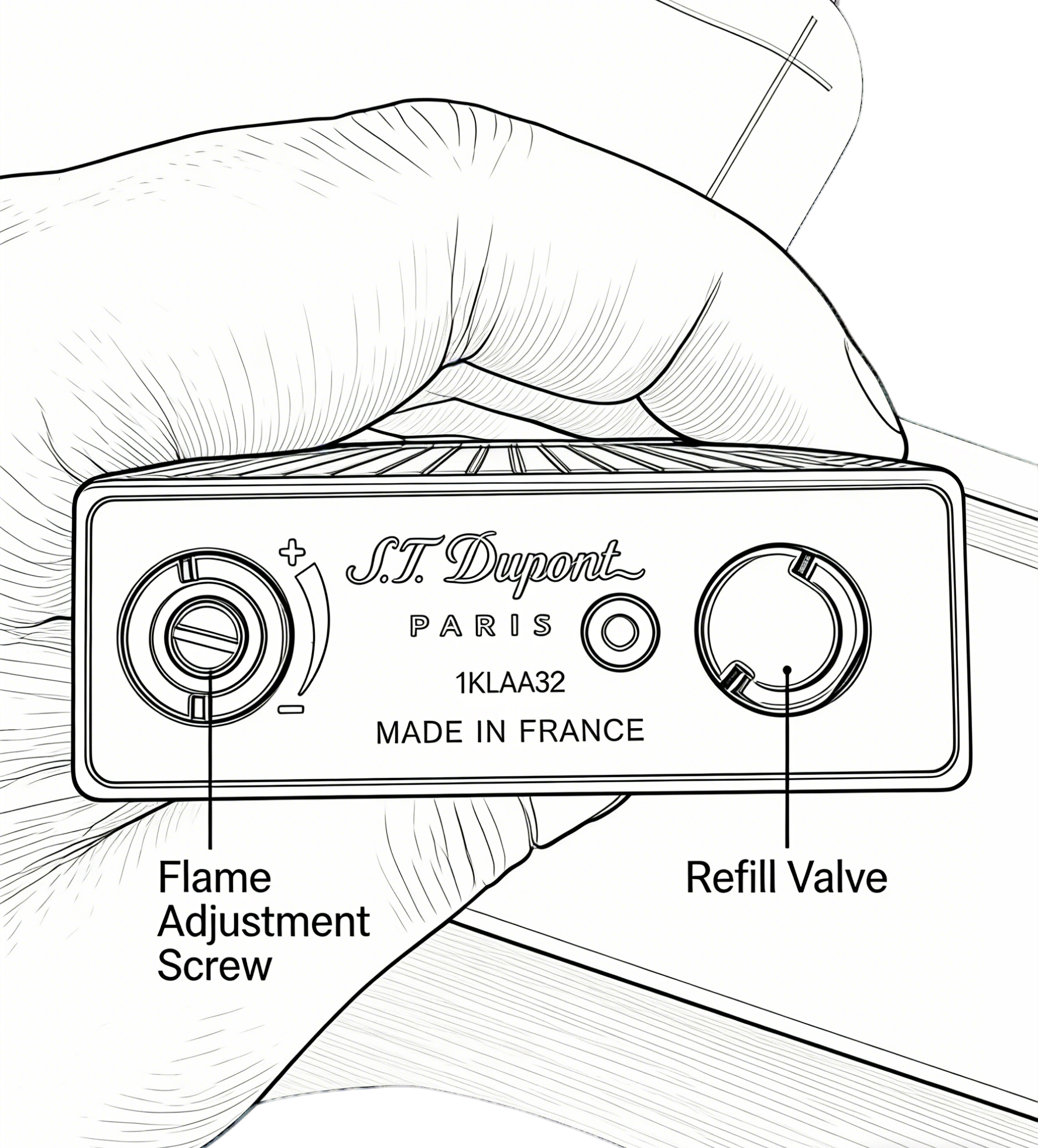
Shake the butane gas can several times before refilling. Then lift the half-ring at the bottom of the lighter and carefully unscrew the Refill Valve.
2.Refill the lighter
Turn the lighter upside down and insert the nozzle of the gas can into the Refill Valve. Press firmly for 3–5 seconds to fill the tank. After refilling, allow the lighter to rest for a few minutes before igniting.
Warning: Refill the lighter away from open flames and in a well-ventilated area.
Note: When your S.T. Dupont lighter cannot be refilled with gas, identifying the root cause quickly will help you resolve the issue more efficiently. The most common reasons include:
1. Use Regular Butane Gas
Due to air transport safety regulations, the lighter is shipped without butane gas. Please purchase butane gas locally and refill the lighter before use.
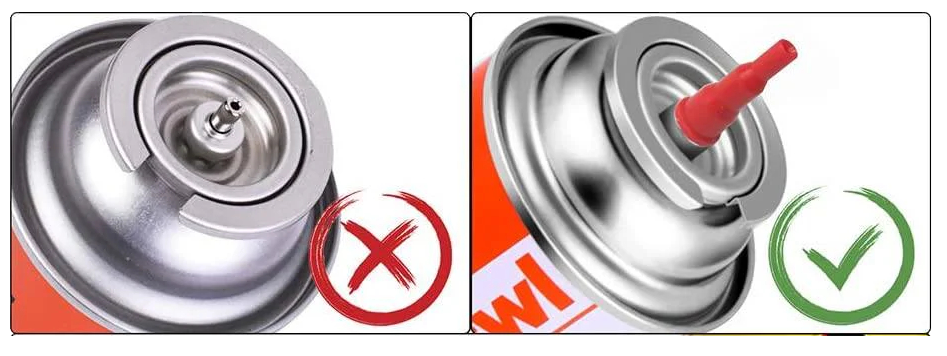
When purchasing butane gas, we recommend choosing a refill can with a plastic red nozzle tip, as this type is more compatible with most lighters and makes refilling easier and more stable. An example of the recommended nozzle type is shown in the image below.
2.GAS LEAKING AFTER REFILLING
If you notice gas leaking after refilling the lighter, please stop using the lighter immediately and contact our customer support team for assistance.
Do not attempt to disassemble the lighter yourself. Contact support: Email: info@batlua007.com
3.LIGHTER HAS SPARK BUT WILL NOT IGNITE
If the lighter produces sparks but cannot ignite, the most common reason is that the lighter does not contain butane gas.
You can test this by using another lighter to try to ignite the lighter's gas outlet. If the gas ignites using another lighter, it means the flint or ignition wheel may be worn and needs to be replaced.
4.LIGHTER HAS GAS BUT PRODUCES NO SPARK
If the lighter contains gas but no spark is produced, the flint or ignition wheel may have worn out over time.
When these parts become worn, they cannot create enough friction to generate sparks. Replacing the flint and checking the ignition wheel usually resolves the issue.
5.FLAME IS TOO SMALL OR FLAME IS TOO HIGH
If the flame is too small, adjust the flame control valve at the bottom of the lighter.
Turn the adjustment screw slightly toward the "+" direction to increase the flame height.If the flame appears too large or unstable, turn the flame adjustment screw slightly toward the "-" direction to reduce the flame size.
6.NEED ADDITIONAL HELP?
If the issue cannot be resolved using the steps above, please contact our customer support team.
Email: info@batlua007.com